How to Find and Apply for LH Rental Notices — Happy Housing, National Rental Housing, and Purchased Rental Housing
Key Summary: LH rental announcements can be viewed alongside sales announcements on the subscription schedule calendar. Clicking on an announcement allows you to check the application schedule and the full text, and applications are submitted via the "Apply " button on LH Subscription Plus. Eligibility criteria and income/asset standards vary by type, so it is essential to review the full announcement.
Public rental housing is highly popular because it allows for long-term residency at a cost lower than market rates, but it is difficult to find due to the wide variety of types and scattered announcements. Home Insight collects LH rental announcements daily and displays them on a subscription calendar.
What types of LH rentals are available?
I have summarized the major types in broad terms. Specific qualifications vary depending on the job posting.
- Happy Housing — It is a public rental housing that primarily supports young people, such as young adults and newlywed couples.
- National Rental Housing — It is public rental housing where low-income, non-homeowning households can reside for a long period.
- Permanent rental — It is rental housing designed to ensure housing stability for the socially vulnerable.
- Public rental housing — a typical type involves living on a rental basis for a certain period before converting to ownership.
- Integrated Public Rental Housing — It is a type that combines public rental housing, which was previously divided into various categories, into one.
- Purchase Lease — This is a type where LH purchases existing housing and leases it out. You can move into housing in the city center.
- Jeonse Lease — This is a type of lease where LH enters into a Jeonse contract for a house selected by an eligible tenant and then leases it out.
Find LH announcements on the calendar
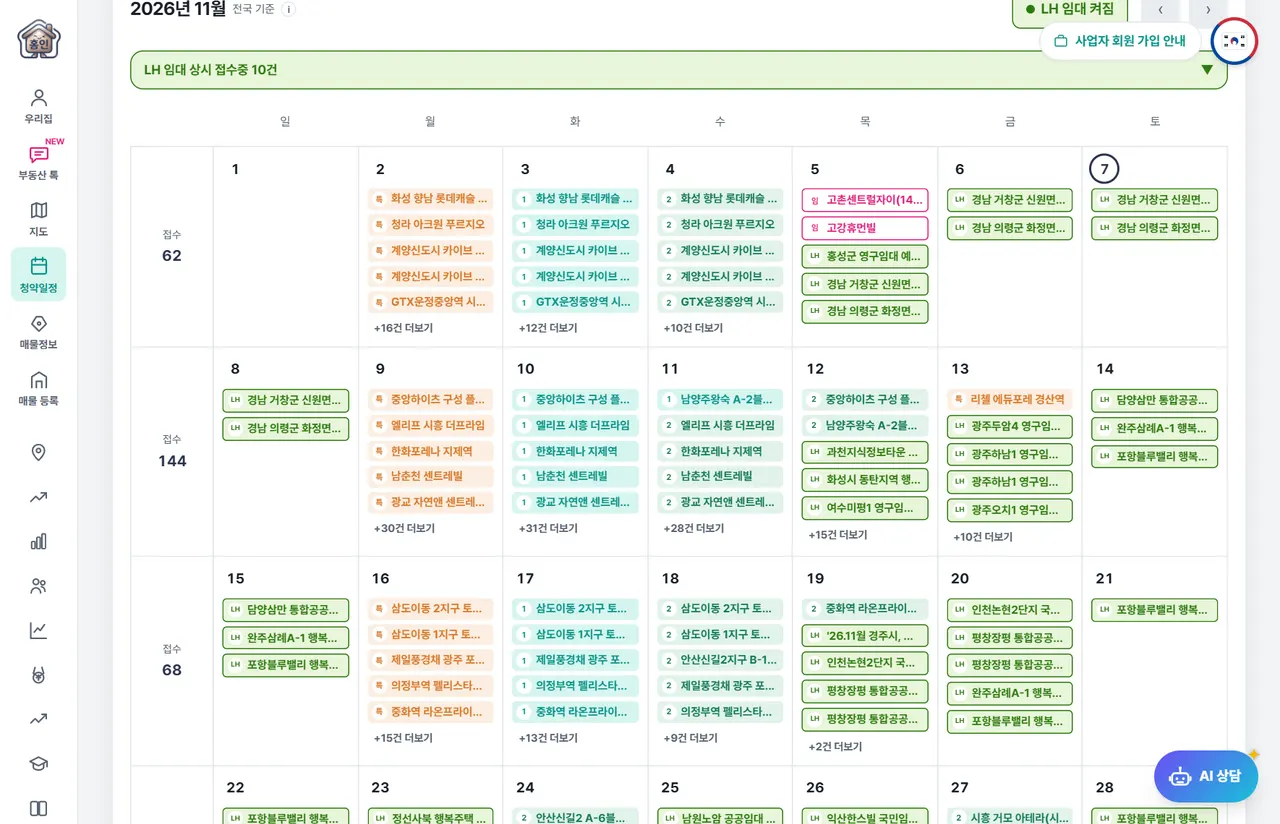
When you open the subscription schedule, the LH rental announcement is turned on from the beginning.
- Green items — These are LH rental announcements. On the PC calendar, the announcement name is displayed in each cell.
- LH Rental Button — You can hide or turn on LH announcements by pressing the button above the calendar.
- Region Filter — Select a City or Province to see only announcements in that region. On mobile, press the region button at the top of the calendar.
- Select Date — On mobile, tapping a date opens the list of job postings open for that day.
What is "Ongoing Applications"?
For announcements with an application period exceeding one month, filling in the calendar cells every day will obscure other announcements. Therefore, we only mark the start and end dates on the calendar and display them collectively in the "Always Accepting Applications" line at the top of the calendar. Tapping the line expands the list, and every day is included in the list that appears when you tap a date.
Please check the announcement details.
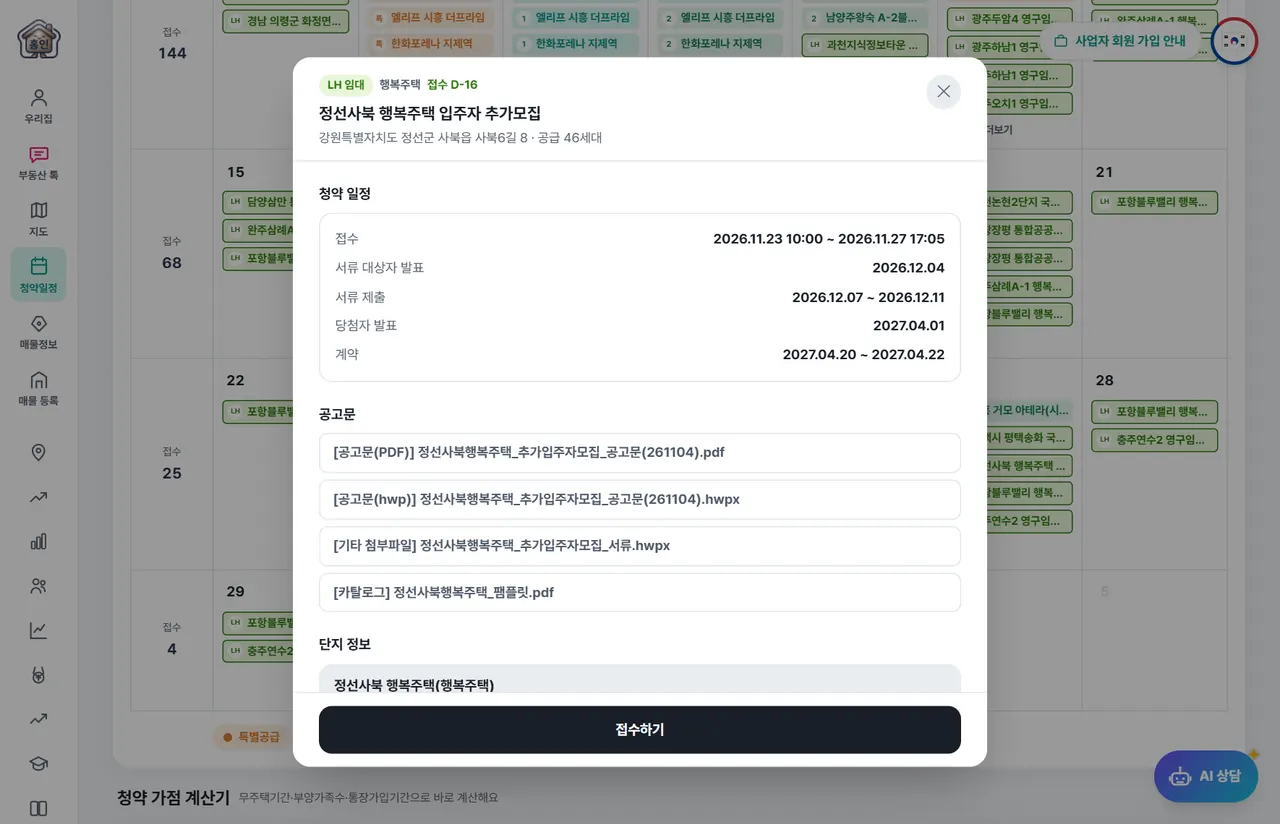
Clicking on the announcement opens the details screen.
- Subscription Schedule — You can view the application period, document submission, winner announcement, and contract schedule.
- Notice — PDF · HWP You can open the notice and attached documents directly.
- Complex Information — Check the location, number of units, exclusive area, and move-in date.
- Apply — The LH announcement page opens in a new window. Proceed with the application here.
The security deposit and monthly rent can often only be found in the announcement. If the amounts are not listed in the details, please open the announcement.
Things to check before applying
- Eligibility — Check if you meet requirements such as age, marital status, and non-homeownership.
- Income and asset criteria — The criteria vary by type and target group.
- Application Period — Check the deadline and time. Some postings close early.
- Submission Documents — Prepare the list of documents for the announcement in advance.
- Regional Requirements — There are announcements that prioritize residents of the relevant area.
If you are curious about the housing subscription process, please check out how to read the subscription schedule and the subscription procedure together.
Frequently Asked Questions
How often are LH rental announcements updated?
We collect LH announcements every morning at dawn and update the calendar. When a correction notice is released, the content changes to the latest version, and previous announcements are hidden.
Do I apply on Home Insight?
No. Home Insight is where you find announcements and check schedules, and you apply on the LH announcement page accessed via the "Apply" button on the details screen.
I don't see the LH announcement on the calendar.
Please check if the LH Rental button on the calendar is turned off. If you have applied a city/province filter, only announcements from that region will be displayed.
Are there also announcements for daycare centers or commercial spaces?
They are not included. I have only collected housing rental announcements and excluded announcements for land, commercial properties, and daycare centers. Supply recommended by institutions is also excluded.